Virtual Baby Shower Bingo: How to Play Over Zoom (2026 Guide)
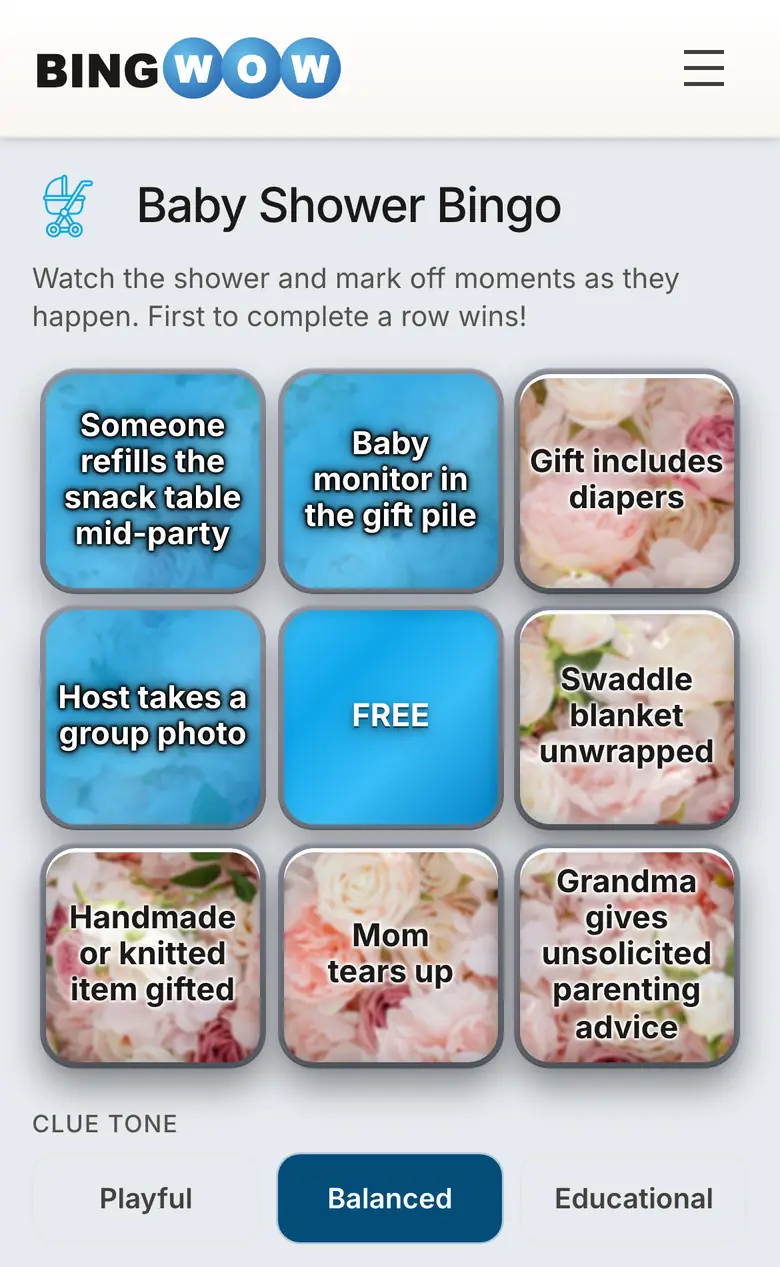
Virtual baby showers are permanent now. Whether it's a friend in another state, a work shower over Teams, or a hybrid event with some guests in the room and some on screen — you need games that work over video. Baby shower bingo is one of the few that translates perfectly to video calls because players mark their own cards independently. No shared screen, no taking turns, no awkward "you're on mute" moments.
This guide covers everything: which platform to use, how to set up cards guests can play on their phones during the call, word lists designed specifically for video-call situations, and tech tips so nothing goes wrong.
Why Bingo Works Better Than Other Virtual Shower Games
Most shower games fall apart over video. Word scrambles require printing and mailing. Trivia needs someone to share their screen and manage answers. "Guess the baby food" requires shipping jars to every guest.
Bingo works because:
- Each player has their own card on their own device — no shared screen needed
- No turns — everyone plays simultaneously
- No audio coordination — players mark squares silently based on what they see/hear
- Works with any video platform (Zoom, Google Meet, FaceTime, Teams, Discord)
- No prep for guests — they click a link and they're playing
Setup: 3 Steps (Under 5 Minutes)
Step 1: Create Your Card
Go to BingWow's card creator and type a topic like "baby shower gift bingo" or "things people say at baby showers." AI generates a full card in ~10 seconds. Edit any squares you want to customize.
Step 2: Share the Link
Copy your card's share link and send it to guests via:
- The Zoom/Teams chat during the call
- The group text thread
- The shower invitation email
- A QR code displayed on screen if some guests are in person
Each guest who clicks the link gets their own uniquely shuffled card. No two players have identical arrangements.
Step 3: Play
Announce the rules in 30 seconds: "I'm going to open gifts on camera. When you see a gift that matches a square on your card, tap it. First person to complete a row wins." That's it.
Which Bingo Format Works Best Over Video?
Gift Bingo (Best for Virtual)
The host opens gifts on camera. Guests mark squares when they see a matching item. This works perfectly over video because the visual is the call — guests SEE the gift, no audio interpretation needed.
Tip: Hold each gift up to the camera for 5-10 seconds and name it aloud. "This is a swaddle set from Aunt Karen!" Remote guests need a clear view and confirmation.
Phrase Bingo (Good for Virtual)
Guests mark squares when they hear someone on the call say a specific phrase. Works well but requires good audio quality — muted guests can't trigger squares. Encourage people to unmute when speaking.
Prediction Bingo (Works Anywhere)
Each guest fills in predictions about the baby. Doesn't require any real-time interaction during the call. Good as a secondary game that resolves after birth.
Video-Call-Specific Squares
Add these to any format for humor that's specific to the virtual experience:
- Someone's on mute and doesn't realize it
- Background kid or pet interrupts
- Someone's camera freezes
- "Can everyone see my screen?"
- Someone joins late and asks what they missed
- Echo or feedback noise
- Someone accidentally uses a filter
- "You're on mute!" (said by anyone)
- Someone's in their car or an unexpected location
- Gallery view suddenly rearranges
- Someone has a creative virtual background
- Technical difficulties cause a pause
- "I wish I could be there in person"
- Someone holds up their pet to the camera
- Grandma needs help with the technology
Mix 3-5 of these into a standard gift bingo card for laughs. See the full word list (150+ options) for more squares.
Tech Tips to Avoid Problems
For the Host
- Test your camera angle in advance. Gifts need to be visible — position the camera so opened items are shown clearly, not in your lap off-screen.
- Use good lighting. Overhead or ring light so guests can identify items on camera.
- Pin the gift-opening feed. If multiple people are on camera, pin the host's video so it's always visible for players.
- Drop the game link in chat BEFORE starting gifts. Late link-sharing means people miss the first few gifts.
- Name each gift aloud. Remote guests can't always tell what an item is through a webcam. "This is a Hatch sound machine!" removes guessing.
- Record the call (with permission). Absent guests can watch later, and the bingo reactions are worth reliving.
For Guests
- Open the bingo card on your phone, keep Zoom on your laptop — this way you can watch the call full-screen and play on a separate device.
- Turn on speaker view (not gallery) so the person opening gifts is large and visible.
- Use headphones to hear gift names clearly without room echo.
- Keep your camera on. Reactions are half the fun — the group wants to see your face when you're one square away from winning.
Hybrid Showers: In-Person + Remote Guests
The most common setup in 2026: some guests are in the room, others are on a screen. Digital bingo cards work for both groups simultaneously. In-person guests play on their phones. Remote guests play on their devices. Everyone's in the same game with the same live updates.
Hybrid tips:
- Set up a laptop or tablet showing the Zoom call where in-room guests can see it
- Point a separate camera at the gift-opening area for remote guests
- Assign one person to manage the tech (unmuting, reading chat messages from remote guests)
- Make sure audio from the room reaches remote guests — use an external microphone if needed
- Announce remote guests' bingo calls aloud so in-room guests hear them
Prize Delivery for Virtual Winners
| Method | Speed | Best For |
|---|---|---|
| Amazon e-gift card | Instant (email) | Any winner, any location |
| Starbucks/DoorDash card | Instant (email/text) | Smaller prize amounts ($5-15) |
| Venmo/PayPal | Instant | Close friends, informal showers |
| Mailed package | 3-5 days | Nicer prizes (candle set, spa kit) |
| Online experience | Book within minutes | Cooking class, wine tasting, spa credit |
Platforms Tested
| Platform | Works? | Notes |
|---|---|---|
| Zoom | Yes | Drop link in chat, pin host video, use speaker view |
| Google Meet | Yes | Share link in chat, works identically |
| FaceTime (Group) | Yes | Send link via iMessage before calling |
| Microsoft Teams | Yes | Post link in meeting chat |
| Discord | Yes | Drop in text channel, voice/video both work |
| WhatsApp Video | Yes | Share link in group chat, smaller groups only (32 max) |
Further Virtual Shower Planning
If you're still mapping out the wider shower — invitations, decor, gift logistics, and a small stack of printable games beyond bingo — Tiffany at Saving Talents wrote a thorough step-by-step virtual baby shower guide that walks through the whole event, including a free printable gift-bingo card alongside the other games. Pair her checklist with BingWow's live multiplayer cards if you want guests to play on their phones during the call.
More Baby Shower Bingo Resources
- Baby Shower Bingo: The Complete Guide — all formats, rules, and hosting tips
- 150+ Baby Shower Bingo Words — the full categorized word list
- 15 Creative Baby Shower Bingo Ideas
- Free Baby Shower Bingo Cards
- How to Play Gift Bingo
- Coed Baby Shower Bingo
- Free Baby Shower Bingo Cards on BingWow
- Browse Baby Shower Occasion Cards